In the ever-evolving world of website building, choosing the right platform can make or break your online presence. In this comprehensive comparison, we dive deep into two popular website builders of 2026, Elementor and Squarespace. Whether you’re a beginner looking for ease of use or a seasoned developer seeking advanced customization options, this article will help you make an informed decision.
What is Elementor?
Elementor is a powerful page builder plugin for WordPress, designed to help users create stunning, responsive websites without any coding knowledge. It offers a drag-and-drop editor, a wide range of pre-designed templates, and extensive customization options. Elementor‘s intuitive interface and vast ecosystem of plugins make it a popular choice among web designers and developers.
Key Features:
- Drag-and-drop editor
- Wide range of pre-designed templates
- Extensive customization options
- Vast ecosystem of plugins
- Integration with popular WordPress themes
What is Squarespace?
Squarespace is an all-in-one website builder that offers everything you need to create a professional website. Known for its visually appealing templates and user-friendly interface, Squarespace provides a seamless website creation experience. From domain registration to built-in SEO tools, Squarespace offers a comprehensive suite of features designed to help you build your online presence.
Key Features:
- Visually appealing templates
- User-friendly interface
- Built-in SEO tools
- Domain Registration
- A comprehensive suite of features
Ease of Use: Which is More User-Friendly?
When comparing the ease of use of Elementor and Squarespace, both platforms offer unique advantages.
Elementor
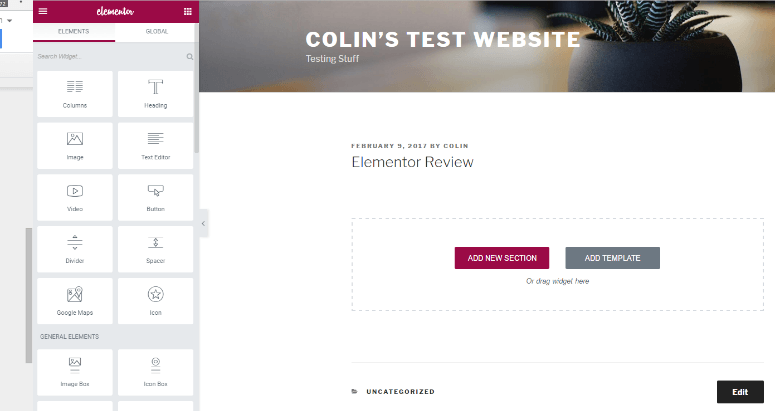
Elementor’s drag-and-drop editor and intuitive interface make it easy for users to build their sites. However, because it is a WordPress plugin, users must have a basic understanding of the WordPress platform.
Squarespace
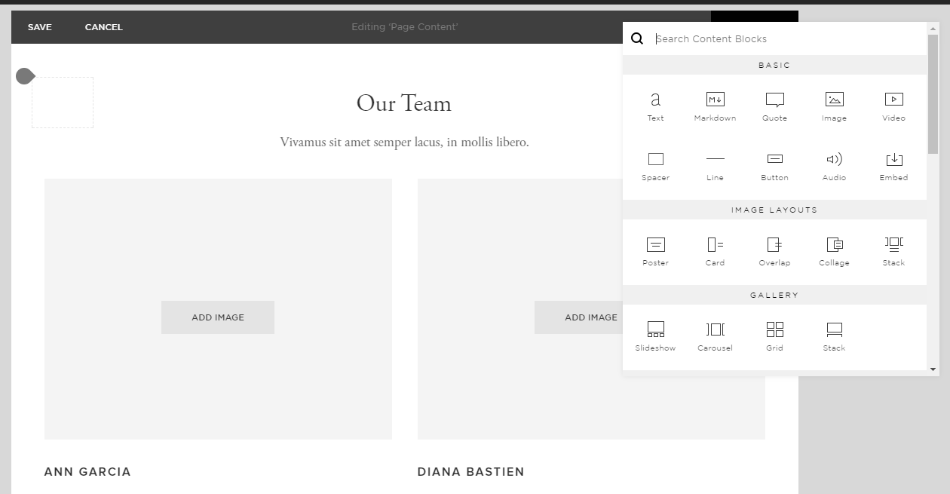
Squarespace, on the other hand, offers an all-in-one solution with a steeper learning curve. Its user-friendly interface and extensive customization options make it a favorite among beginners and those seeking an all-in-one solution.
Customization and Design Options
Customization is a crucial factor when choosing a website builder. Both Elementor and Squarespace offer robust customization options, but they cater to different needs.
Elementor
Elementor provides extensive customization options, allowing users to tweak every aspect of their site. With Elementor Pro, users get access to advanced features like theme builder, pop-up builder, and WooCommerce builder, making it ideal for those seeking detailed control over their site’s design.
Squarespace
Squarespace offers a wide range of pre-designed templates that are visually appealing and designed to be mobile-responsive. While its customization options are more limited compared to Elementor, Squarespace makes it easy to create a professional-looking site with minimal effort.
AI Features & Automation
Artificial intelligence has a major impact on website building decisions in 2026. Both Elementor and Squarespace use AI to simplify design, speed up development, and improve content creation, but their approach and depth of automation are different.
Elementor AI Features
Elementor AI is built to assist with text generation, code creation, and layout suggestions directly inside the WordPress editor. Users can generate website copy, rewrite content for clarity or SEO, and create custom CSS or HTML using simple prompts.
This is especially useful for designers, developers, and marketers who want more control and faster workflows. Elementor AI also helps improve page structure and layout decisions, making it easier to build high-converting pages.
Squarespace AI Features
Squarespace AI focuses on content creation and guided design assistance. It helps generate website copy, page sections, and layout structures based on the business niche and website goals.
The platform automatically maintains visual consistency across pages, which makes it ideal for users who want a clean, professional design without spending time on customization. While it does not support advanced code generation, it offers a smooth and beginner-friendly experience.
Which AI Is Better for Beginners
For beginners, Squarespace AI is generally the better choice. Its guided setup, limited customization, and automated design decisions make it easy to launch a website quickly without technical knowledge.
Elementor AI is more powerful but works within the WordPress ecosystem, which may require a learning curve. However, beginners who are willing to learn WordPress can benefit from its flexibility and long-term scalability.
E-commerce Capabilities: Elementor vs Squarespace
For businesses looking to set up an online store, both Elementor and Squarespace offer robust eCommerce capabilities.
Elementor
Elementor integrates seamlessly with WooCommerce, the popular WordPress e-commerce plugin. This integration allows you to create highly customizable product pages, manage inventory, and track sales. Elementor’s e-commerce features are ideal for those looking for advanced customization and flexibility.
Squarespace
Squarespace offers built-in e-commerce tools that are perfect for small to medium-sized businesses. With features like product pages, inventory management, and analytics, Squarespace makes it easy to set up and run an online store. However, its e-commerce capabilities are more limited compared to Elementor.
SEO Features and Tools
SEO is a critical component of any website. Both Elementor and Squarespace offer tools to help you optimize your site for search engines.
Elementor:
Elementor provides various SEO tools through its integration with popular WordPress SEO plugins like Yoast SEO and Rank Math. These tools offer advanced features to optimize your content, manage metadata, and improve your site’s overall SEO performance.
Squarespace:
Squarespace offers built-in SEO tools that are user-friendly and effective. From custom meta tags to clean URLs, Squarespace provides everything you need to optimize your site for search engines. While it may not offer the same level of advanced features as Elementor, Squarespace’s SEO tools are more than sufficient for most users.
Integration with Other Platforms

Integrating your website with other platforms is essential for business growth and efficiency. Both Elementor and Squarespace offer various integration options.
Elementor
Elementor’s integration capabilities are extensive, thanks to the vast ecosystem of WordPress plugins. Whether you need to integrate with email marketing services, social media platforms, or CRM systems, Elementor offers a plugin for almost every need.
Squarespace
Squarespace provides a range of built-in integrations with popular services like Mailchimp, Google Analytics, and social media platforms. While its integration options are more limited compared to Elementor, Squarespace still offers enough integrations to meet most business needs.
Pricing: Which Offers Better Value?
Pricing is a crucial consideration when choosing a website builder. Both Elementor and Squarespace offer different pricing models.
Elementor
Elementor offers a free version with limited features, making it accessible for beginners. For more advanced features, Elementor Pro pricing plans, start from $59 per year. This makes Elementor a cost-effective choice for users looking for flexibility and customization.
Squarespace
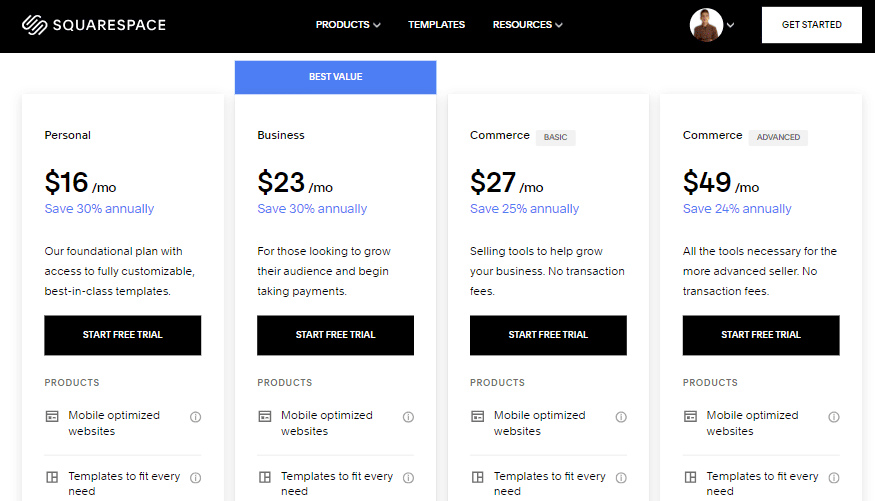
Squarespace offers a 14-day free trial, after which users can choose from several pricing plans, starting at $16 per month on Annual Subscription. While Squarespace’s pricing is higher than Elementor’s free version, it offers an all-in-one solution that includes hosting, domain registration, and customer support.
Customer Support and Community
Reliable customer support and an active community can significantly enhance your experience with a website builder.
Elementor
Elementor provides extensive documentation, tutorials, and a supportive community forum. For Pro users, Elementor offers premium support, ensuring that any issues are resolved promptly.
Squarespace
Squarespace offers 24/7 customer support through live chat and email. Its extensive knowledge base and active community forum provide additional resources for users. Squarespace’s support is highly regarded for its responsiveness and effectiveness.
Final Verdict: Choosing Between Elementor and Squarespace
Choosing between Elementor and Squarespace ultimately depends on your specific needs and preferences.
- Elementor: Ideal for users looking for advanced customization, flexibility, and integration with WordPress. Its free version makes it accessible for beginners, while Elementor Pro offers advanced features for professional web designers.
- Squarespace: Perfect for users seeking an all-in-one solution with visually appealing templates and a user-friendly interface. Its built-in features and comprehensive support make it a reliable choice for small to medium-sized businesses.
Bullet Point Summary:
- Elementor:
- Powerful page builder plugin for WordPress
- Drag-and-drop editor with extensive customization options
- Integrates seamlessly with WooCommerce for e-commerce capabilities
- Offers various SEO tools through WordPress plugins
- Cost-effective with a free version and affordable Pro plans
- Extensive documentation, tutorials, and premium Assistance for Pro users
- Squarespace:
- All-in-one website builder with visually appealing templates
- User-friendly interface with built-in SEO tools and domain registration
- Offers built-in e-commerce tools for small to medium-sized businesses
- Provides a range of built-in integrations with popular services
- Higher pricing compared to Elementor’s free version, but includes hosting and customer support
- 24/7 customer support with live chat and email
Choosing between Elementor and Squarespace comes down to your specific requirements. Elementor is ideal for those seeking flexibility and advanced customization, while Squarespace is perfect for users looking for an all-in-one solution with ease of use and professional templates.