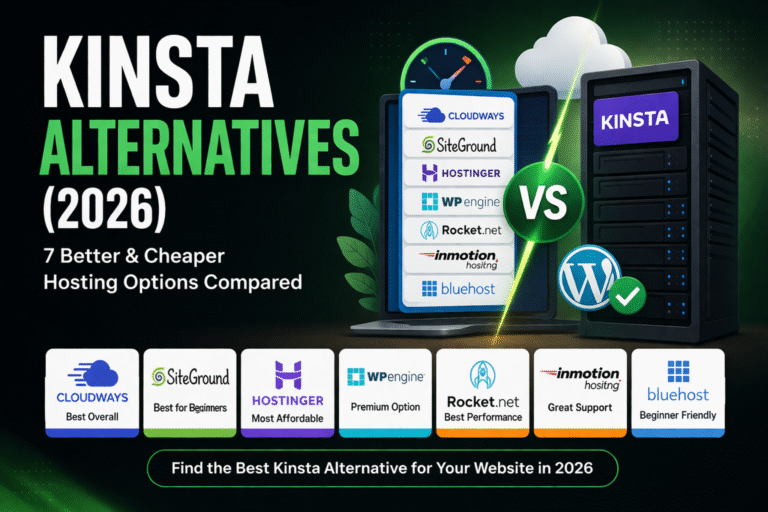
Kinsta is one of the most talked-about managed WordPress hosting providers in the industry. Built on Google Cloud Platform with premium infrastructure and excellent support, it has earned its reputation. But it is also one of the most expensive options available, with plans starting at $35 per month and scaling steeply from there.
If you are looking for Kinsta alternatives in 2026, whether because of the price, the feature set, or simply because you want to explore what else is out there, you have come to the right place. In this guide, we have tested and compared seven of the best Kinsta alternatives, covering performance, pricing, features, and who each one is best suited for.
Before you commit to any hosting provider, it is also worth reading our detailed Kinsta hosting review to understand exactly what you are comparing against.
Why Look for a Kinsta Alternative?
Kinsta is genuinely good at what it does. Fast servers, excellent uptime, a clean dashboard, and knowledgeable support. But there are real, legitimate reasons why it may not be the right fit for everyone.
- Price: Kinsta’s entry plan starts at $35/month for just one website. For bloggers or small businesses on a budget, that is hard to justify.
- Visitor limits: Every Kinsta plan has a monthly visitor cap. Exceed it and you pay overage fees, which can add up quickly.
- No email hosting: Kinsta does not include email hosting on any plan. You will need a separate service like Google Workspace.
- WordPress only: Kinsta is built exclusively for WordPress. If you run other PHP applications, it is not an option.
- No phone support: Support is chat and ticket based only. Some businesses prefer phone support for critical issues.
Understanding what Kinsta lacks helps you know what to look for in an alternative. Let us get into the options.
7 Best Kinsta Alternatives in 2026
1. Cloudways – Best for Flexibility and Developers
Cloudways is a managed cloud hosting platform that sits between unmanaged VPS hosting and fully managed WordPress hosting. Instead of running its own servers, Cloudways lets you deploy on top of your preferred cloud provider including DigitalOcean, AWS, and Google Cloud, while handling all the server management for you.
This makes it one of the most flexible Kinsta alternatives available. You get enterprise-grade infrastructure at a fraction of Kinsta’s price, with the freedom to choose your cloud provider and scale your resources at any time without changing plans.
- Starts at $11/month (DigitalOcean)
- Pay-as-you-go pricing model
- Unlimited applications per server
- Free SSL and daily automated backups
- Staging environment on all plans
- Cloudflare Enterprise add-on available
- 3-day free trial, no credit card required
- 24/7 expert support via live chat
- Choice of DigitalOcean, AWS, Google Cloud
- Advanced caching with Breeze plugin
One thing that sets Cloudways apart from Kinsta is its pricing philosophy. While Kinsta charges per website with visitor caps, Cloudways charges per server resource. One server can host unlimited websites, which makes it ideal for agencies or anyone managing multiple sites. At $11 per month for a DigitalOcean server, you can comfortably run several small to medium sites that would cost $35 each per month on Kinsta.
The trade-off is that Cloudways requires a bit more technical understanding than Kinsta. The dashboard is intuitive, but you will need to understand concepts like server sizing and scaling. For most developers and agencies, this is not a barrier. For complete beginners, it might be.
2. Bluehost – Best Budget WordPress Hosting
Bluehost is one of the most recognizable names in WordPress hosting, officially recommended by WordPress.org alongside SiteGround and DreamHost. It has been in the industry since 2003 and currently powers over 2 million websites globally. If affordability and ease of use are your priorities, Bluehost is worth a serious look.
While it is not a like-for-like replacement for Kinsta in terms of raw performance, it is one of the most beginner-friendly hosts available and offers excellent value at entry-level price points.
- Shared hosting from $2.95/month
- Free domain name for the first year
- Free SSL certificate on all plans
- One-click WordPress installation
- Free Cloudflare CDN integration
- 24/7 customer support
- Unmetered bandwidth on most plans
- WordPress.org officially recommended
- 30-day money-back guarantee
- cPanel access for easy management
Bluehost is the most budget-friendly option on this list by a significant margin. At $2.95 per month for shared hosting, the gap compared to Kinsta’s $35 per month entry price is enormous. Of course, these are fundamentally different products. Kinsta gives you dedicated cloud resources, advanced caching, and a fully managed environment. Bluehost at the entry level gives you shared hosting where resources are split among many users on the same server.
Where Bluehost stands out is in WordPress integration and ease of use. The one-click install, free domain, free SSL, and official WordPress.org recommendation make it one of the smoothest experiences for anyone new to WordPress hosting. It is also worth noting that Bluehost’s managed WordPress plans offer better performance than the shared options, starting at a slightly higher price but still well below Kinsta.
3. SiteGround – Best for Beginners Who Want Premium Features
SiteGround is one of the most respected names in WordPress hosting, also officially recommended by WordPress.org. It has grown significantly since 2004 and now hosts over 2.8 million domains worldwide. What sets SiteGround apart from budget hosts is that it offers genuinely premium features, including Google Cloud infrastructure, at relatively affordable prices.
SiteGround is often positioned between cheap shared hosting and full managed hosting like Kinsta, making it a great middle-ground option for growing websites.
- Starts at $3.99/month (renews at $17.99)
- Built on Google Cloud infrastructure
- Free daily backups on all plans
- Proprietary SuperCacher for speed
- Free Cloudflare CDN on all plans
- Free SSL certificates
- 99.9% uptime guarantee
- 24/7 expert support, highly rated
- Free website migration
- WordPress.org officially recommended
SiteGround competes directly with Kinsta on some fronts that budget hosts cannot. Both use Google Cloud Platform infrastructure. Both offer staging environments, advanced caching, and free daily backups. The difference is mainly in the level of management, server resources, and support depth. Kinsta’s team is more deeply focused on WordPress optimization at the enterprise level, but for most sites running under a few thousand daily visitors, SiteGround delivers excellent results at a fraction of the price.
One thing SiteGround does better than Kinsta is its support quality at entry-level pricing. SiteGround’s support is consistently rated among the best in the industry and is available on all plans, not just premium tiers.
4. InMotion Hosting – Best for US-Based Businesses
InMotion Hosting has been in the hosting industry for over 20 years and has built a strong reputation, particularly among US-based businesses. It is one of the few hosting providers where all support staff and data centers are located within the United States, which matters significantly for businesses with compliance requirements or a strong preference for domestic infrastructure.
InMotion offers a wide range of hosting types including shared, WordPress-optimized, VPS, and dedicated hosting, making it one of the most versatile options on this list.
- Starts at $2.99/month
- All US-based support team
- 90-day money-back guarantee
- Free SSD storage on all plans
- Free website migration
- Free SSL certificates
- Unlimited bandwidth on most plans
- cPanel and WHM access
- 24/7 phone, chat, and email support
- VPS and dedicated options available
InMotion Hosting fills a specific gap in the market. When US businesses need hosting with domestic support, data residency, and phone support, InMotion is one of the best options available. Kinsta offers no phone support at any tier, which can be a dealbreaker for businesses that need immediate verbal communication during critical issues.
InMotion’s 90-day money-back guarantee is also notably longer than any competitor on this list, giving you three months to fully evaluate the service before committing. This level of confidence in their product is rare in the industry.
5. Hostinger – Cheapest Kinsta Alternative
Hostinger is the most aggressively priced hosting provider on this list, offering some of the cheapest shared and WordPress hosting plans in the industry. Despite the low prices, Hostinger has made significant investments in performance and infrastructure over the past few years, and their results have improved substantially.
If budget is your primary concern and you are running a small personal website, blog, or startup with limited traffic, Hostinger delivers impressive value at an almost unbeatable price point.
- Starts from $1.99/month
- Free domain on Premium and Business plans
- Free SSL on all plans
- NVMe SSD storage for fast performance
- Hpanel custom control panel
- LiteSpeed web servers
- Weekly backups on basic plans
- Daily backups on Business plan and above
- AI website builder included
- 30-day money-back guarantee
Hostinger at $1.99 per month sits at the complete opposite end of the price spectrum from Kinsta at $35 per month. The comparison is almost unfair because these are fundamentally different products targeting different audiences. But if you are a blogger or small site owner who has been looking at Kinsta and thinking the price is too steep, Hostinger shows that you can host a professional WordPress site for a fraction of the cost.
Hostinger has invested in LiteSpeed web servers and NVMe storage, which gives their servers better performance than many shared hosts charging similar prices. For low to moderate traffic sites, the performance gap between Hostinger and Kinsta is smaller than you might expect. The main differences become apparent at higher traffic volumes and when you need advanced WordPress-specific optimizations.
6. WP Engine – Best for Agencies and Enterprise
WP Engine is arguably Kinsta’s closest direct competitor. Both are premium managed WordPress hosting providers, both target developers and agencies, and both offer enterprise-grade performance. The main differences come down to pricing structure, included tools, and development workflow preferences.
WP Engine has been in the managed WordPress space longer than almost any other provider and has built a significant set of developer tools around their platform, including Genesis Framework themes and the Local development environment.
- Starts at $23/month (intro price)
- Proprietary EverCache caching technology
- Global CDN included on all plans
- Staging environments on all plans
- Genesis Framework and StudioPress themes included
- Git integration for developers
- Local development environment tool
- 60-day money-back guarantee
- 24/7 chat support on all plans
- Automated daily backups
WP Engine and Kinsta are so similar in positioning that choosing between them often comes down to personal preference and workflow. WP Engine’s EverCache system is a proprietary caching technology built specifically for WordPress performance and is highly regarded. Their 60-day money-back guarantee is also twice as long as Kinsta’s 30-day guarantee, giving you more time to evaluate the service.
One area where WP Engine edges ahead of Kinsta for agency users is the included Genesis Framework and StudioPress premium themes. These are included at no extra cost and are widely used in professional WordPress development. The Local development tool also makes the WordPress development workflow significantly smoother for teams working on client sites.
7. Rocket.net – Best for Raw Speed and Performance
Rocket.net is one of the newer players on this list but has quickly built an impressive reputation in the WordPress hosting community, particularly among performance-focused users. Its standout feature is the inclusion of Cloudflare Enterprise on every single plan, including the entry-level tier. The Cloudflare Enterprise plan alone is valued at thousands of dollars per month, making Rocket.net an extraordinary value for users who prioritize global performance.
Rocket.net was founded by Ben Gabler, who has deep expertise in WordPress, CDN technology, and hosting infrastructure. That focused expertise is evident in how the platform is built.
- Starts at $30/month
- Cloudflare Enterprise CDN included on all plans
- Exceptional TTFB scores globally
- Unlimited free WordPress migrations
- Automatic daily backups
- Free SSL certificates
- Staging environments on all plans
- 24/7 expert WordPress support
- 30-day money-back guarantee
- Malware scanning and removal
Rocket.net consistently achieves some of the best Time to First Byte (TTFB) scores in global performance tests, particularly in regions like India, the Middle East, and Africa where many hosting providers struggle due to limited CDN coverage. This is directly attributable to Cloudflare’s enterprise network, which has data centers in far more locations than any individual hosting provider’s infrastructure.
At $30 per month, Rocket.net is only slightly cheaper than Kinsta’s $35 entry plan. But the Cloudflare Enterprise inclusion and the performance results put it in a very compelling position for anyone who cares deeply about global website speed.
🚀 Looking for the Best Hosting Deal?
Check out our recommended hosting providers above and find the one that fits your budget and performance needs. All links are affiliate links that support this site at no extra cost to you.
👉 See Our Top Hosting RecommendationsHead-to-Head Comparison: All 7 Alternatives vs Kinsta
| Host | Starting Price | Type | Free Backups | Staging | Phone Support | Best For |
|---|---|---|---|---|---|---|
| Kinsta | $35/month | Managed WP | Yes | Yes | No | Enterprises |
| Cloudways | $11/month | Cloud Managed | Yes | Yes | No | Developers |
| Bluehost | $2.95/month | Shared/Managed | Higher plans | Higher plans | Yes | Beginners |
| SiteGround | $3.99/month | Cloud Shared | Yes | Yes | No | SMBs |
| InMotion | $2.99/month | Shared/VPS | Yes | VPS plans | Yes | US businesses |
| Hostinger | $1.99/month | Shared | Business plan | No | No | Budget users |
| WP Engine | $23/month | Managed WP | Yes | Yes | Higher plans | Agencies |
| Rocket.net | $30/month | Managed WP | Yes | Yes | No | Performance |
Which Kinsta Alternative Should You Choose?
The right answer depends entirely on what you are optimizing for. Here is a clear breakdown based on your specific situation.
You manage multiple client sites
One server hosts unlimited sites. Pay-as-you-go is far cheaper than per-site managed hosting at scale.
You are a complete beginner
Both are WordPress.org recommended, beginner-friendly, and include everything you need to get started quickly.
You need US-based support
All-American support team, domestic data centers, and phone support at every tier.
Budget is your top priority
The cheapest option on the list with surprisingly capable infrastructure for the price.
You are a WordPress developer or agency
Git integration, Local development tool, staging environments, and Genesis themes make it the agency standard.
Performance is everything
Cloudflare Enterprise on every plan delivers the best global TTFB scores of any host at this price point.
Is Kinsta Still Worth It in 2026?
Yes, for the right user. If you are running a high-traffic WordPress site, need enterprise-level support with deep WordPress expertise, and want a completely hands-off managed hosting experience, Kinsta remains one of the best options in the market. Their infrastructure, uptime record, and support quality are all genuinely excellent.
But for the vast majority of WordPress users, including bloggers, small businesses, freelancers, and even many agencies, the alternatives on this list offer 80 to 90 percent of Kinsta’s quality at 20 to 50 percent of the price. That gap is hard to ignore.
Make sure to read our full Kinsta hosting review if you want a deeper look at what Kinsta specifically offers before making your final decision.
What to Look for in a Kinsta Alternative
When evaluating any hosting provider as a Kinsta alternative, these are the key factors you should be comparing.
Server Infrastructure
Kinsta runs on Google Cloud Platform. Some of the alternatives on this list, including SiteGround and Cloudways (via your cloud provider choice), also give you access to Google Cloud infrastructure. Others use their own data centers or different cloud providers. The infrastructure provider matters significantly for performance, particularly for global audiences.
Caching Technology
Kinsta uses a custom page caching setup built on top of Nginx. Look for alternatives that offer server-level caching rather than relying entirely on WordPress caching plugins. SiteGround’s SuperCacher, WP Engine’s EverCache, and Cloudways’ Breeze plugin all offer effective server-level caching that dramatically reduces server load and improves page load times.
Backups and Disaster Recovery
Kinsta includes daily automatic backups on all plans. Before choosing an alternative, verify that backups are included in the plan you are considering and understand how long backups are retained. Some hosts only offer backups as a paid add-on or on higher-tier plans.
Staging Environments
A staging environment lets you test changes to your WordPress site in a private copy before pushing updates live. This is a standard feature on Kinsta. Among the alternatives, WP Engine, Cloudways, SiteGround (on higher plans), and Rocket.net all include staging. Bluehost includes it on managed WordPress plans but not on shared hosting.
Support Quality and Availability
Kinsta’s support team is highly trained specifically in WordPress. When evaluating alternatives, look at the depth of WordPress expertise in their support team, not just availability. A host with 24/7 chat that does not understand WordPress internals is less useful than a host with limited hours but deep WordPress knowledge.
Scalability
As your website grows, you may need more resources. Consider how easy it is to scale up on your chosen platform. Cloudways makes this particularly seamless since you can resize your server with a few clicks. Traditional shared hosting providers like Bluehost and Hostinger require you to upgrade to a different plan type as you grow.
How to Migrate from Kinsta to Another Host
Moving your WordPress site from Kinsta to any of the alternatives above is a straightforward process. Here is the general approach.
- Use a migration plugin: Plugins like All-in-One WP Migration or Duplicator can export your entire site and reimport it on your new host with minimal technical knowledge required.
- Use the new host’s migration service: Most of the alternatives on this list, including Cloudways, WP Engine, SiteGround, and Rocket.net, offer free migration services where their team handles the move for you.
- Test before switching DNS: Set up your site on the new host and test it thoroughly before changing your DNS records. This ensures no downtime during the transition.
- Keep Kinsta active during DNS propagation: DNS changes can take up to 48 hours to fully propagate. Keep your Kinsta site running during this period to prevent any visitors from seeing downtime.
- Update your domain nameservers last: Once you have confirmed your site is working correctly on the new host, update your domain’s nameservers to point to the new provider.
Frequently Asked Questions
Final Verdict: Best Kinsta Alternatives in 2026
Kinsta is an excellent hosting provider, but it is not the only excellent hosting provider. The seven alternatives in this guide cover every type of WordPress user, from complete beginners to enterprise agencies, and every budget from under $2 per month to $30 per month.
Here is our final recommendation summary:
- Best overall alternative: Cloudways – flexibility, price, and performance make it the most versatile option
- Best for beginners: SiteGround – Google Cloud infrastructure at an accessible price
- Best for agencies: WP Engine – developer tools, staging, and Git integration
- Best for performance: Rocket.net – Cloudflare Enterprise on every plan
- Best budget option: Hostinger – lowest price with decent infrastructure
- Best US support: InMotion Hosting – domestic team, phone support, 90-day guarantee
- Best for WordPress beginners: Bluehost – WordPress.org recommended, beginner-friendly
Whatever your needs, there is a Kinsta alternative on this list that fits your budget and requirements. And if you are still evaluating Kinsta itself, read our full Kinsta hosting review before making a final decision.
🔍 Need Help Choosing the Right Host?
Browse our detailed hosting reviews and comparisons to find the perfect WordPress hosting solution for your specific needs and budget.
👉 See All Hosting Recommendations